

Today I am finally bringing you the Minecraft AI bot post from the CS Bootcamp I took this summer.
I had a bit of trouble thinking about how I wanted to structure this post, I don’t want to make a full on tutorial for different reasons:
- It would take too long.
- Most steps are boring.
- At this point I’ve forgotten most of the boring steps.
- I don’t think gathering all the pieces to make a comprehensive guide for a blog which gets less than 100 views per year is the smartest use of my time.
Instead, I will explain the coolest parts like the machine learning (ML) model training, give some general guidance, and link some useful resources if by any chance anyone wants to try this at home.
So, what exactly does the project consist on?
The project consists on creating a Minecraft player bot, and making it be able to differentiate pigs from dogs. For this we will need a couple of things, firstly, a Minecraft LAN server for the bot to login to, secondly, a Minecraft bot, and finally the ML model which will distinguish these animals.
Setting a Minecraft server is very simple, here’s a comprehensible guide from my teacher from the Bootcamp: https://github.com/msicilia/minevision/blob/master/MCServer.md
For setting up the bot we will use Mineflayer, a JavaScript API which will make the setup a smooth sail and give us a variety of tools for us to use.
From here one would code the bot, but let’s create the ML model first so that we can later plug it into the bot. For showing this I am experimenting and embedding my python notebook, which I used to create this model. I believe showing the code this way will make the post more visual, however I will not be to commentate in between so let me explain real quick what happened here, because this is by far the coolest part of the project.
So, as I said in other posts, this was my first time playing around with AI and ML, I will talk more about my conclusions and takeaways at the end of the post, but one thing that I learnt, is that machine learning just consists on training models to fit sets of data, simple as that. First I create a model by giving it a set of data and telling it how it should be classified, in this case with the pictures of pigs and dogs, here’s where the magic happens as the program will seek patterns in the pictures and correlations between those patterns and its classification. So for example it will think: “This picture contains pink, and is labeled as a pig, interesting.” and after seeing 100 pictures which share that same relation it’ll learn that pictures which contain pink are pigs. It creates this model for analyzing data, however, when the bot is evaluating if an animal is a pig or a dog, the bot isn’t doing no machine learning, it’s just inputting the data into the already created model.
So the following code is the creation of this model, to recreate this yourself you will just need to click the “open with colab” button and run each script. Disclaimer, you will need to create a mob folder and set its path in the second script, this a folder which contains two folders, one named “pigs” and the other named “dogs”, and you will need to fill these folders with pictures of each animal respectively, the more pictures the better the model will be.
What the first scripts do is access these images and create the dataset by giving each image a label based on what folder they belong to. After this it resizes the images so that they are all the same and can be red by the engine, and it also splits the dataset into images used for learning, and images used for testing, as it wouldn’t make sense to test the model with the same images it is using as reference.
Once the dataset is ready, we make the machine start learning, the engine we are using is called “resnet34”.
After the model is created we test it, and show the results in different ways such as the “confusion matrix” you can see bellow which shows how much it failed.
If we are satisfied with the results we can export the model, which will give us the file “export.pkl”.
Now is when we need to tie everything together, and I get a bit lost in the steps.
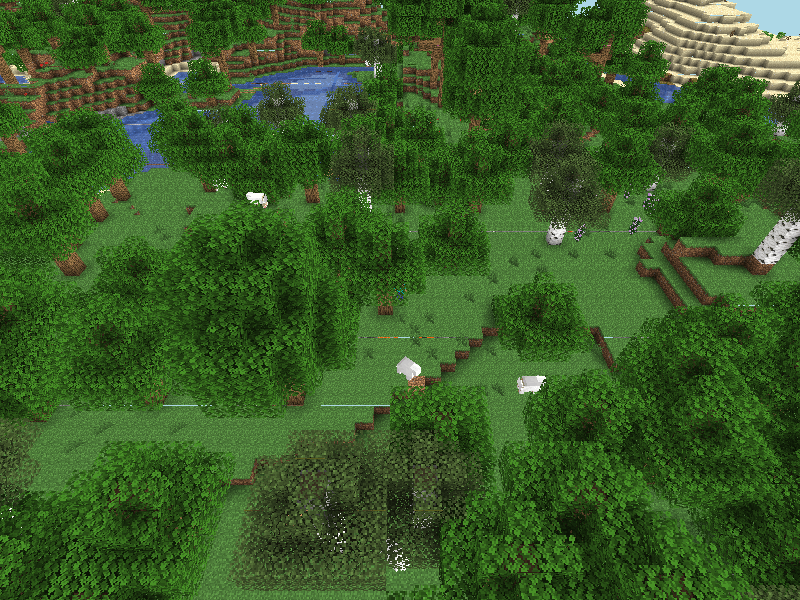
The way in which we make the bot “see” is by having it take screenshots every so often, and upload these to a localhost, where it can point the model to, and ask it what’s in the image (both of the following scripts are written in JavaScript).
The script for the bot is the following:
const mineflayer = require('mineflayer')
const { chromium } = require("playwright");
// const axios = require('axios').default;


const mineflayerViewer = require('prismarine-viewer').mineflayer


const bot = mineflayer.createBot({
  username: 'Bot'
})

const awaitTimeout = delay =>
  new Promise(resolve => setTimeout(resolve, delay));


bot.once('spawn', () => {
  mineflayerViewer(bot, { port: 3000,
                         firstPerson:true})
  const interval = setInterval(async () => {
        let browser = await chromium.launch();
        let page = await browser.newPage();
        await page.setViewportSize({ width: 1280, height: 1080 });
        await page.goto("localhost:3000");
        await awaitTimeout(4000);
        await page.screenshot({ path: `image.png` });
        await browser.close();
/*        axios({
          method: 'get',
          url: 'http://127.0.0.1:8080/checkimage/image.png'
        }).then(apiResponse => {
           console.log(apiResponse.data)
           if (apiResponse.data.probs[apiResponse.data.classidx]> 0.8){
              console.log(`I love ${apiResponse.data.label} like this one.`)
              bot.chat(`I love ${apiResponse.data.label} like this one.`)
           }
        }) */

      }
  , 5000);


})
This code does exactly what was previously described, take the screenshot, upload it, and await a response from the model, then based on the probability of the image containing animal x or y it will log a message in the Minecraft chat, this message will be: “I love pigs/dogs like this one”.
The code for the model is the following:
from bottle import route, run as bottle_run, template
from fastai.vision.all import *

learn = load_learner('export.pkl')

@route('/checkimage/<image>')
def index(image):
    label, labelnum, probs = learn.predict(image)
    return {"label" : label, "classidx" : labelnum.item(), "probs": probs.tolist()}

bottle_run(host='localhost', port=8080)
This just returns the probability of the animal being x or y which the previous script interprets.
And that’s pretty much it, there’s probably some other script which connects it all that I’m missing but I’ll leave that to you. Now for my conclusions, this project was beyond cool, I loved learning about these topics I had been hearing about for ages, and also loved implementing them in a game which I’ve played for thousands of hours but somehow manages to keep surprising me. It really made me see how useful this stuff can be at a bigger scale, beyond that I don’t want to extend my comments much more, the fields of artificial intelligence and machine learning are super exciting, and I cannot wait to do more stuff within them. Hope you enjoyed the entry! I think this is one of my favorites thus far.
 Serna Productions
Leave a comment